from pathlib import Path
import numpy as np
import pandas as pd
import matplotlib.pyplot as plt
import matplotlib

print("pandas version:", pd.__version__)
print("numpy version:", np.__version__)
print("matplotlib version:", matplotlib.__version__)Regression

The goal of this notebook is not to master every detail of machine learning, but to understand the whole game. You’ll follow the complete CRISP-DM process, from Business Understanding to Evaluation, experiencing each phase in a simple and structured way. Deployment is the final phase of CRISP-DM; in this course it is limited to saving your trained model.
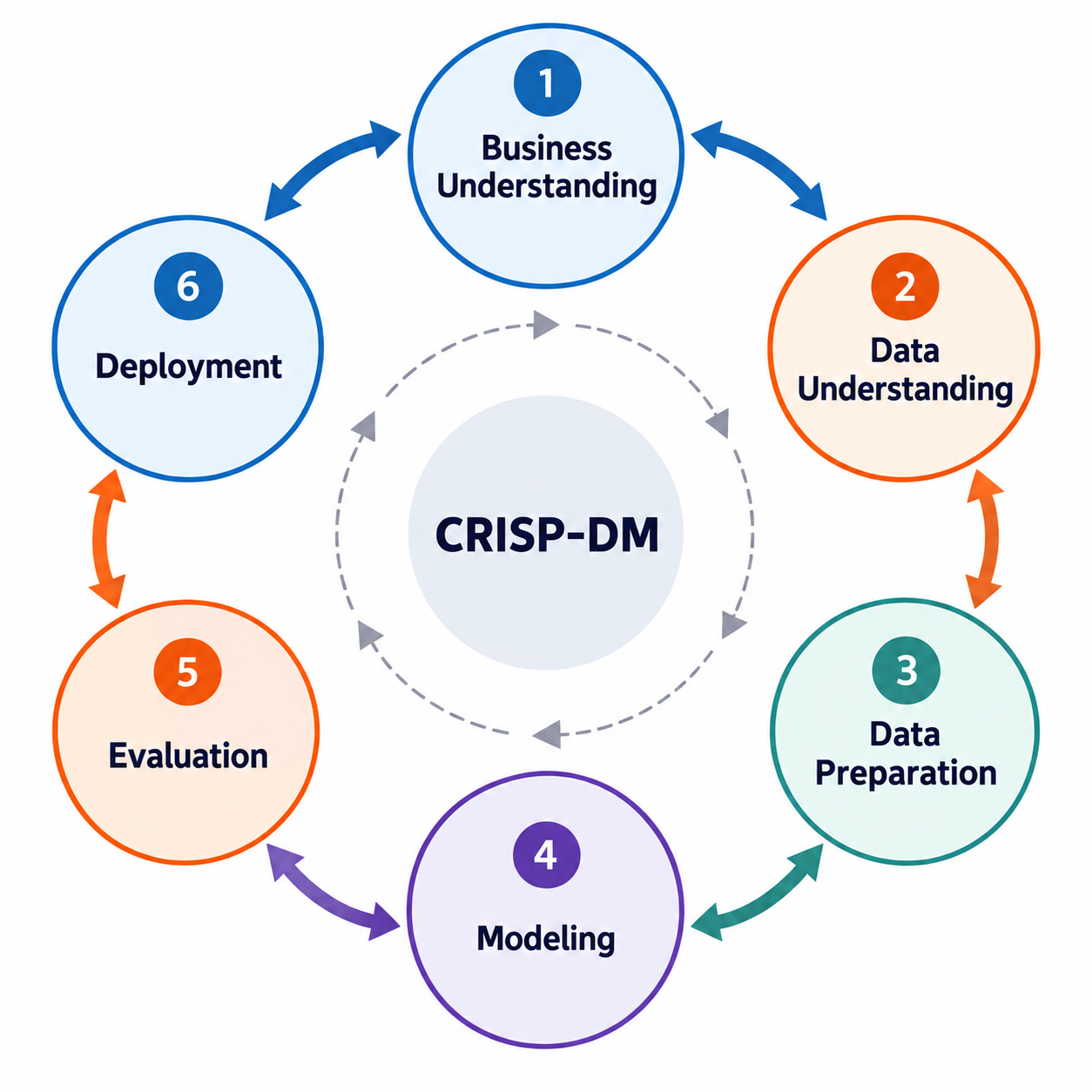
In this notebook you will work through the main phases of a data science project:
- Phase 1 – Business Understanding: Explore why predicting molecular properties is valuable and what questions we want to answer.
- Phase 2 – Data Understanding: Learn how the molecular dataset is obtained and identify which columns are inputs (features) and which is the output (target).
- Phase 3 – Data Preparation: Prepare the dataset so it can be used for training models.
- Phase 4 – Modelling: Train a regression model to predict energy levels. (HOMO and LUMO)
- Phase 5 – Evaluation: Assess the performance of your trained model.
- Phase 6 – Deployment: Save the trained model for future use.
The goal here is not to perfect each step, but to connect them and see how the entire process fits together. By the end, you’ll have experienced the full machine learning workflow and gained insight into the lifecycle of a data science project.
Let’s get started!
1. Business Understanding
Read the Business Understanding page before continuing.
2. Data Understanding
Read the Data Understanding page before continuing.
Your Turn
Read starter_dataset.xlsx as a pandas dataframe into the df variable. You can find it under data/002_processed_data.
# YOUR CODE HEREYour Turn
Use the df.info() method to explore the dataset, and answer the following:
- How many rows and columns does the dataset contain?
- How many numerical and non-numerical (object) columns are there?
# YOUR CODE HEREYour Turn
Use the df.describe() method to generate descriptive statistics for the dataset, then answer the following questions:
- Does the number of columns shown in the output match the total number of columns in the dataset?
- If not, why is there a mismatch? (For example, you might see 221 columns in total, but only 219 in the summary.)
# YOUR CODE HEREYour Turn
By default, the df.describe() method returns descriptive statistics for numerical columns only. Explore the documentation and identify the parameter that allows you to include all columns, including categorical ones, in the summary. Then, modify your code to display descriptive statistics for all columns in the dataset.
# YOUR CODE HEREYour Turn
Identify the non-numerical columns in the dataset and store their names in a list of strings.
# YOUR CODE HEREYour Turn
Check for missing values in the dataset. Count the number of NaN values in each column, and if a column contains any missing values, print its name along with the number of missing entries.
# YOUR CODE HEREYour Turn
First, locate the column names corresponding to the target variables. Then, determine whether each target variable should be treated as a regression or classification task.
# YOUR CODE HEREYour Turn
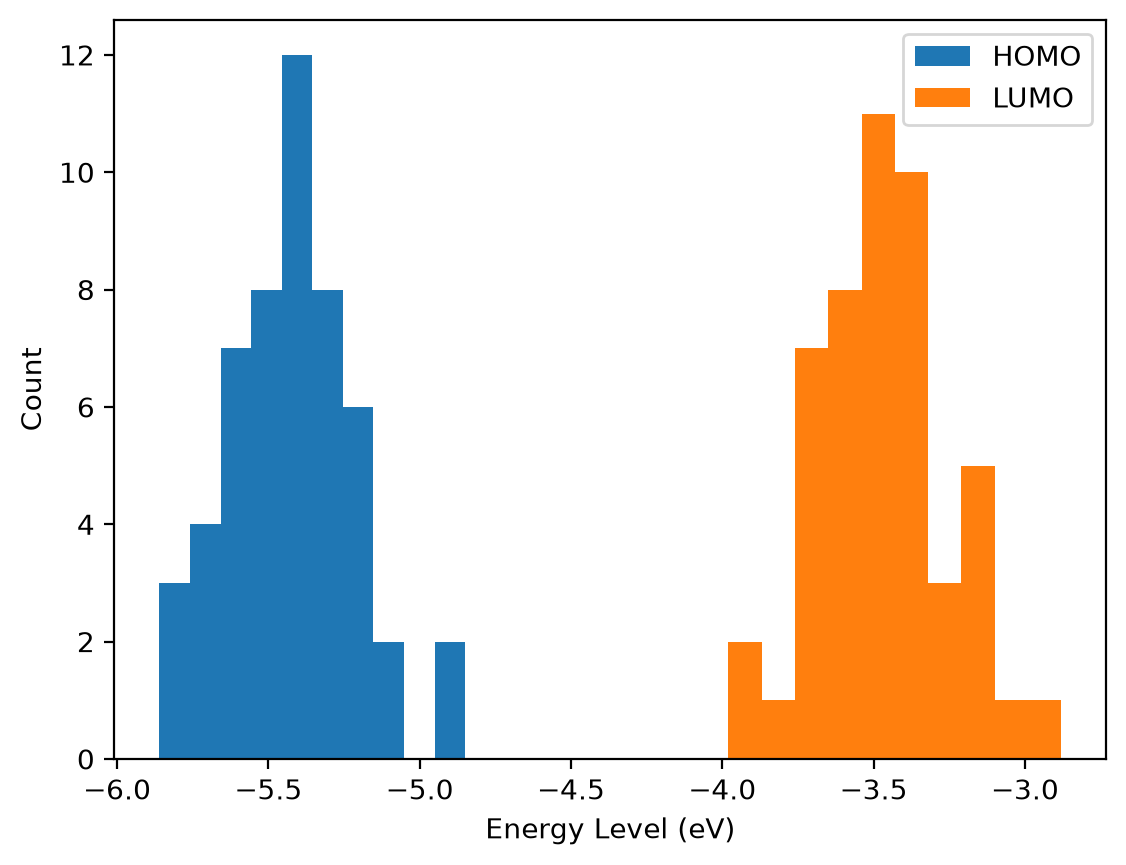
It is key for you to understand the distribution of target variables. Replicate the following plots:
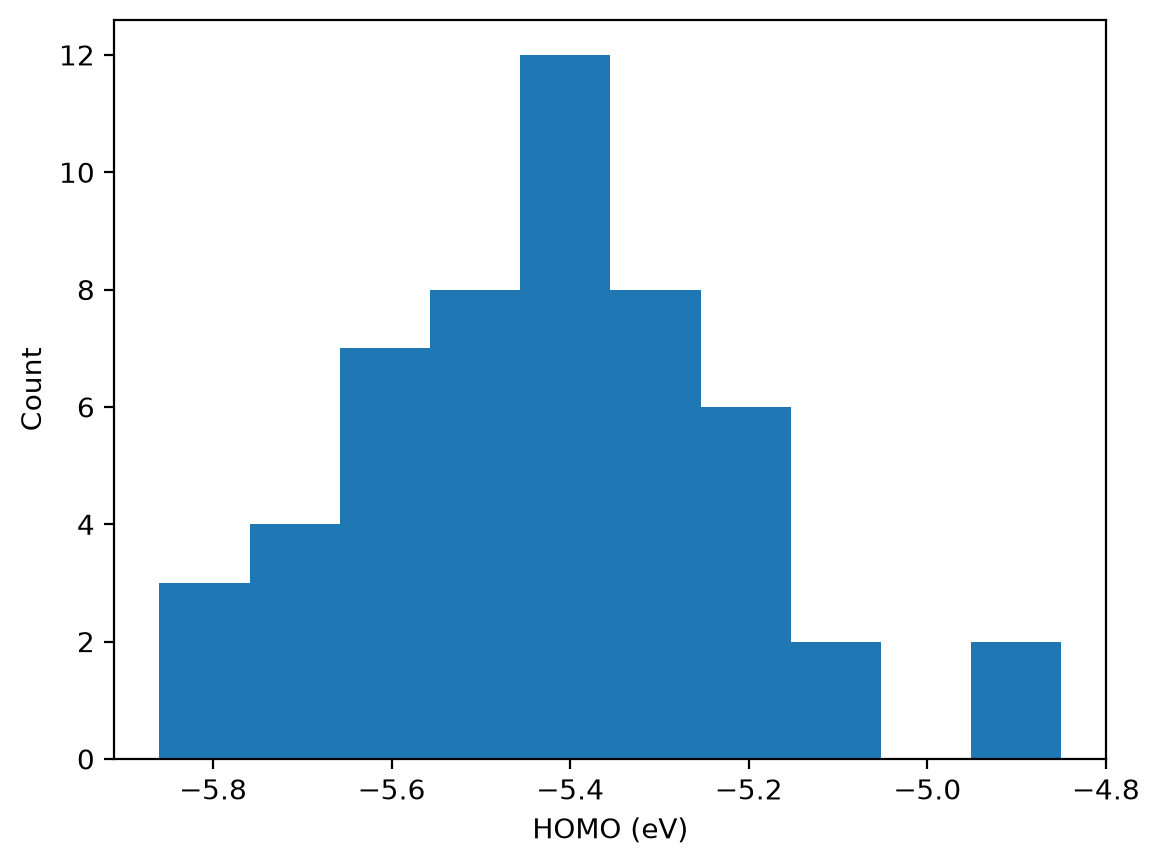
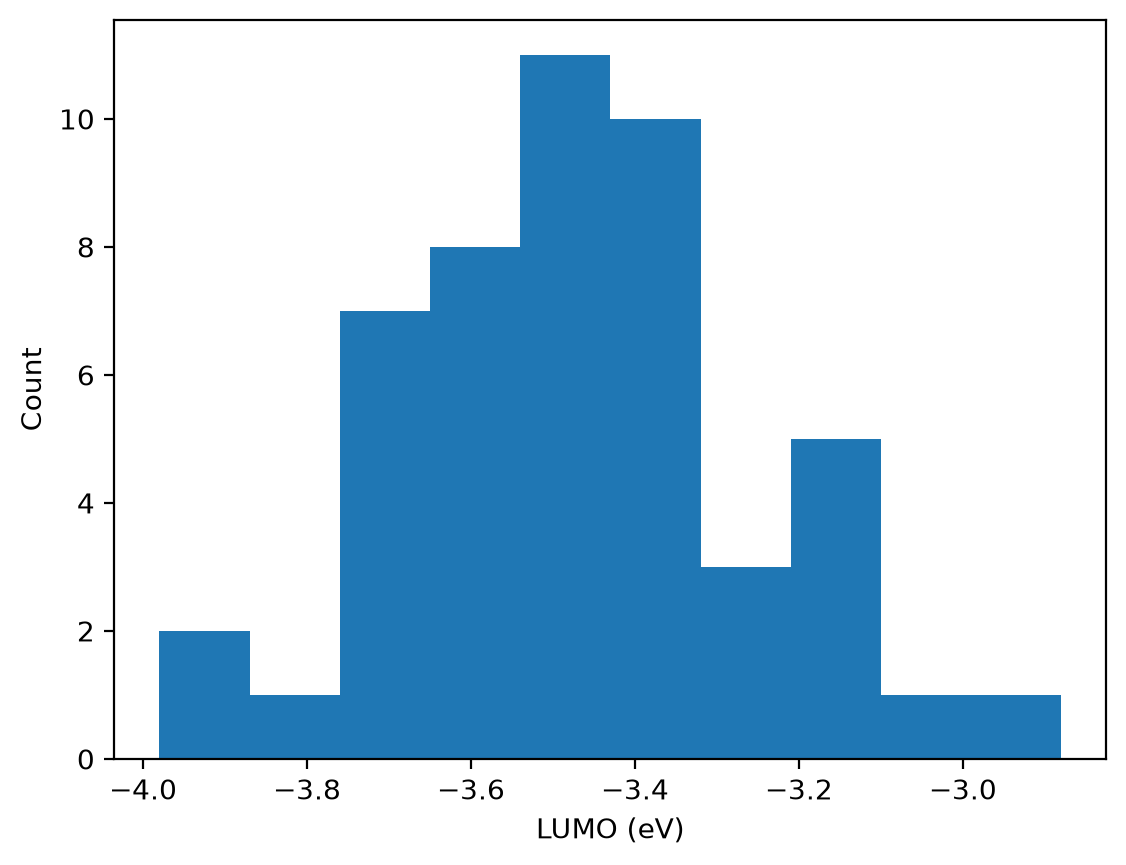
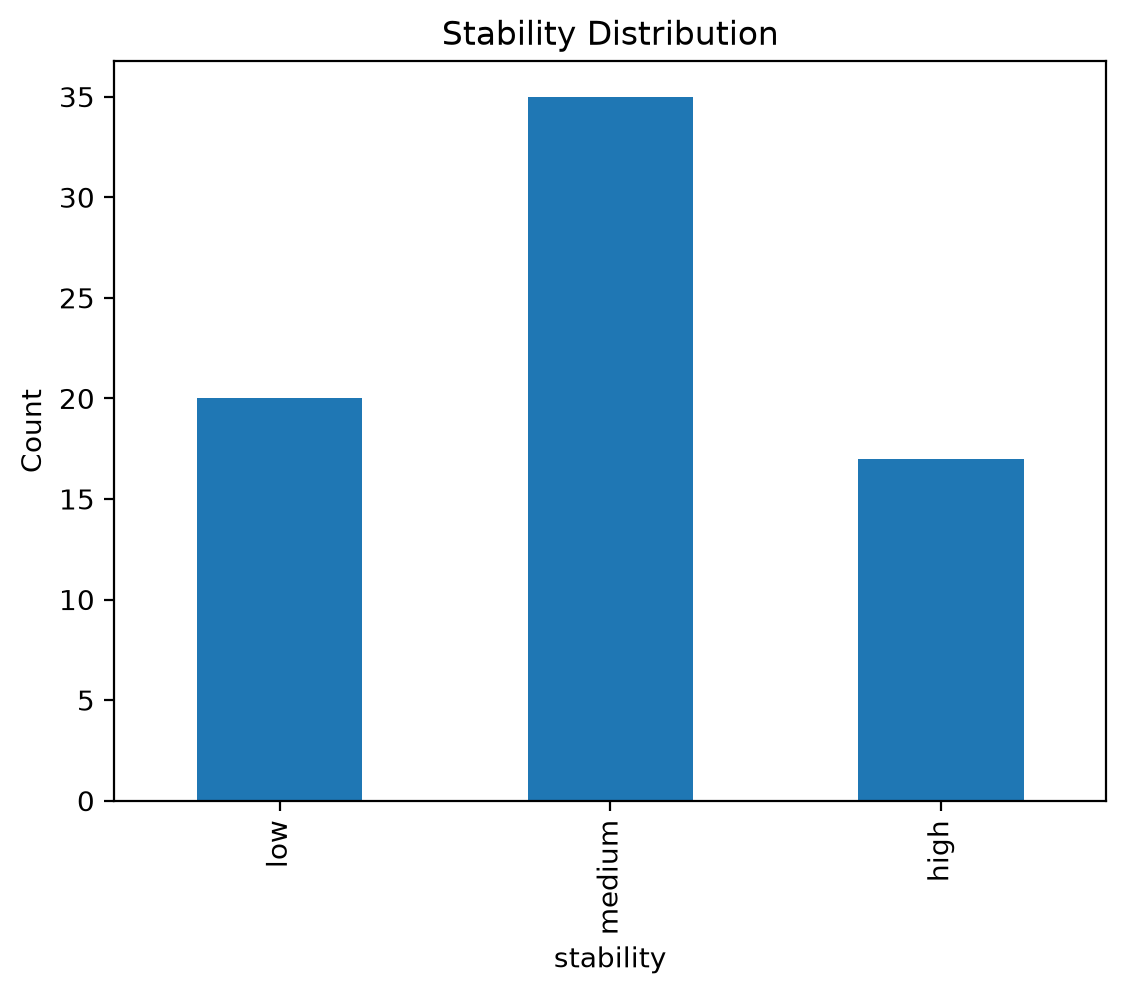
Note: Both HOMO and LUMO represent molecular orbital energy levels. As explained in the business understanding document, LUMO values are generally expected to be higher (i.e., closer to zero) than HOMO values. Let’s verify whether this pattern holds in our dataset.
# YOUR CODE HERE# YOUR CODE HERE# YOUR CODE HERE# YOUR CODE HERE3. Data Preparation
As explained in the Data Understanding section, the dataset is already prepared for you. Therefore this section will be short.
Your Turn
Remove all rows from the DataFrame where either the homo or lumo or stability column contains a missing value (NaN). Is this really the best way?
# YOUR CODE HEREYour Turn
Many scikit-learn models expect numerical values as input, so non-numerical features can cause errors. In the starter_dataset.xlsx, all our input features are numerical.
- Keep the column
stabilityas it is, for classification, scikit-learn can handle string labels directly. - Drop the column
smiles, since it is not an input to the model.
# YOUR CODE HERE4. Modelling
df.head()We have two target variables: homo and lumo. There are two possible approaches: either train a single model to predict both simultaneously or train separate models for each target. In this section, we will focus on building a model to predict lumo. At the end, in section 6, you will be asked to build a similar model for predicting homo.
Your Turn
Create the input features X by selecting the molecular descriptor columns, and set the target variable y to the lumo column. You can do this by slicing the DataFrame so that X contains all descriptor columns and y contains only lumo.
# YOUR CODE HEREBefore building a model, it is useful to establish a non-learning baseline. Your model should perform better than this baseline; otherwise, there is little point in training a model.
For regression tasks, a common baseline is to always predict the mean of the target variable. The performance of this baseline can be measured using an error metric such as Mean Absolute Error (MAE).
Your Turn
Calculate the MAE you would achieve if you always predict the mean of y. For this first quick estimate you can use all of y. Strictly speaking, a baseline should be treated like a model: compute the mean from the training set only (y_train.mean()) and measure its MAE on the test set, so that it is compared with your model on the same data.
# YOUR CODE HEREYour Turn
Import train_test_split from sklearn.model_selection, and use it to split your data into training and test sets. The training set should contain 80 percent of the data and the test set the remaining 20 percent. Set random_state=42 to ensure reproducibility. Finally, check the shapes of X_train, y_train, X_test, and y_test to confirm the split worked correctly.
# YOUR CODE HEREYour Turn
Import the RandomForestRegressor from sklearn.ensemble, create a model instance with random_state=42 for reproducibility, and fit the model on the training data (X_train, y_train).
# YOUR CODE HERE5. Evaluation
In this section, you will assess the performance of your model. To do this, we use data that the model has not seen during training, that’s why we created a test set. Use X_test to generate predictions (y_pred), and then compare these predictions to the true labels (y_test).
Your Turn
Use the trained model’s .predict method with X_test and save the predicted labels in y_pred.
# YOUR CODE HEREYour Turn
Evaluate the model’s performance using scikit-learn’s built-in metrics. Import mean_absolute_error from sklearn.metrics, calculate the mean absolute error by comparing y_test and y_pred, and report the result in 3 decimal places.
# YOUR CODE HEREIs the model performing better than the baseline? Remember that your first model may not capture much. Through iterations, such as adding more data, refining features, tuning hyperparameters, or trying different algorithms, you should be able to surpass the baseline. If, after many attempts, the model still cannot beat the baseline, this may suggest that the dataset does not contain enough signal to learn from.
Your Turn
While overall metrics like accuracy and mean absolute error are useful, it’s also important to look at individual predictions to understand how the model behaves on specific cases. Create a DataFrame that compares the model’s predictions (y_pred) with the true labels (y_test). This will let you inspect individual results alongside the aggregate performance.
# YOUR CODE HERE6. Modelling and Evaluation (HOMO predictor)
Build a second model to predict homo and evaluate its performance using the mean absolute error on the test set. Create a baseline by calculating the Mean Absolute Error (MAE) when predicting the mean of y for all observations. Then, compare the results of the two models and determine which performs better: the homo predictor or the lumo predictor.
# YOUR CODE HERE6. Deployment
As mentioned at the beginning of this notebook, we will not go into the full deployment phase. Deployment refers to everything involved in making a model available for real users, and the very first step in that process is saving the trained model so it can be reused later.
Your task is to save the trained model, so that you can later use it to make predictions (inference) on new molecules, such as the molecules of the Kaggle competition. Save your model in the models folder at the root of the course repository.
But before doing so, consider the following question:
Should you just save the model as it is? Or is there an extra step you should take?
Think about this for a moment before reading on.
When we did a train/test split, the purpose was to evaluate our model on unseen data. However, once we are done with testing and want to actually use the model (for example, to submit predictions in a competition), we might want to retrain it on the entire dataset. Training on all the data could potentially improve performance, since the model sees more examples, but the downside is that we no longer have a test set to estimate its accuracy.
In the case of a Kaggle competition, the performance estimate can instead come from the public leaderboard score, which serves as feedback on how well your model is doing compared to others.
Your Turn
This time you have two models. Retrain the models on the entire dataset and save them as
homo_iteration1.jobliblumo_iteration1.joblib
under the folder models.
# YOUR CODE HERE