import numpy as np
import pandas as pd
import matplotlib.pyplot as pltRegression

Regression in machine learning is the task of predicting a continuous numerical value for each input based on learned patterns from labeled training data. Predicting the price of a house from its features such as size, location, and number of rooms is a regression problem.
Building a regression model is similar to classification in many ways, but there are also key differences. Let’s train our first regression model and see how it compares to what we learned in classification.
1. Your first regression model
# load the dataset
# the target, y, is continuous, so this is suitable for a regression problem
from sklearn.datasets import load_diabetes
X, y = load_diabetes(as_frame=True, return_X_y=True)
The goal is to predict a quantitative measure of diabetes progression one year after the baseline. It has 10 features such as age, sex, body mass index (BMI), blood pressure, and blood serum measurements.
Remember: unlike classification datasets, the target (y) here is continuous, it can take many values, not just 0 or 1.
# instead of importing RandomForestClassifier
# we import RandomForestRegressor
from sklearn.ensemble import RandomForestRegressor
model = RandomForestRegressor(random_state=0)
# same as classification
from sklearn.model_selection import train_test_split
X_train, X_test, y_train, y_test = train_test_split(X, y, test_size=0.2, random_state=0)# same as classification
model.fit(X_train, y_train)RandomForestRegressor(random_state=0)In a Jupyter environment, please rerun this cell to show the HTML representation or trust the notebook.
On GitHub, the HTML representation is unable to render, please try loading this page with nbviewer.org.
Parameters
Fitted attributes
# Same as classification,
# but now the output values are continuous numbers.
y_pred = model.predict(X_test)
y_pred
array([249.77, 237.06, 173.44, 110.9 , 214.83, 268.97, 96.11, 210.42,
145.59, 245.27, 173.51, 146.31, 131.37, 99.04, 274.61, 84.17,
166.55, 82.06, 116.32, 208.43, 174.46, 134.4 , 179.6 , 120.47,
207.11, 193.46, 146.17, 74.95, 194.32, 168.62, 182.36, 73.27,
117.48, 150.84, 140.29, 171.14, 167.36, 149.67, 94.26, 213.24,
107.22, 164.27, 117.81, 186.5 , 192.07, 87.66, 129.8 , 134.4 ,
109.53, 236.78, 160.93, 67.58, 155.66, 162.49, 240.94, 197.51,
178.46, 85.3 , 126.57, 163.15, 240.76, 145.89, 123.13, 96.55,
266.96, 156.54, 97.13, 227.93, 215.67, 118.82, 83.68, 147.32,
124.48, 119.23, 126.9 , 181.13, 123.59, 225.33, 245.61, 215.59,
119.85, 186.75, 69.72, 239.35, 111.09, 92.45, 151.87, 194.59,
99.81])This changes how we evaluate the model. A simple way to see how well it performs is to plot predictions vs. true labels on a scatter plot.
plt.scatter(y_test, y_pred)
plt.xlim(0, 350)
plt.ylim(0, 350)
plt.plot([0, 350], [0, 350], label='perfect prediction line')
plt.xlabel("Labels (y_test)")
plt.ylabel("Predictions (y_pred)")
plt.legend()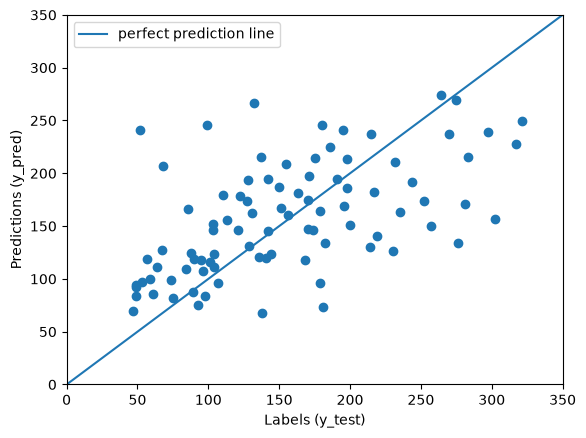
Points close to the line are great (perfect if exactly on the line). Points far from the line are poor. To measure performance, we can check the average difference between predictions and true values, which is the error.
error = y_pred - y_test
error
362 -71.23
249 22.06
271 46.44
435 46.90
400 39.83
...
381 7.09
213 43.45
134 48.87
49 52.59
52 40.81
Name: target, Length: 89, dtype: float64We could take the average error, but positive and negative values would cancel out. For example, +100 and -100 average to 0, which hides the real error.
# very low comparing to the errors we see in the plot
# which is due to positive and negative errors cancelling each other
np.mean(error)np.float64(3.534269662921351)To fix this, we take the absolute value of each error.
np.abs(error)362 71.23
249 22.06
271 46.44
435 46.90
400 39.83
...
381 7.09
213 43.45
134 48.87
49 52.59
52 40.81
Name: target, Length: 89, dtype: float64Then we take the mean, this gives us an error value that actually makes sense.
np.mean(np.abs(error))np.float64(47.75224719101124)this is called the mean absolute error (MAE). You can tell from the code:
np.mean(np.abs(error))
and you guessed it right, it is already implemented in scikit-learn
YOUR TURN
Calculate MAE using scikit-learn’s implemented method, you should obtain the same value you obtained above.
# YOUR CODE HEREMy MAE was 47.75, yours might differ slightly due to randomness.
2. Baselines
Is this a good model? What does a MAE of ~48 even mean?
In classification, model performance is easier to interpret, for example, an accuracy of 90% sounds good because we know that for a binary and balanced problem, random guessing gives about 50% accuracy (like flipping a coin). So, 90% is clearly much better than chance.
In regression, interpretation depends on the domain. If you’re predicting house prices, a $1,000 error might be excellent, while a $100,000 error would be terrible. The meaning of the error depends entirely on the scale of the target variable.
When we don’t know the domain, a useful baseline is to predict the average of the training targets for every test data point and measure the resulting MAE. This baseline acts like the “coin flip” in classification, if your model doesn’t perform better than this, it isn’t learning anything meaningful.
# the average of y_train
# like a model, the baseline may only learn from the training data
y_train.mean()np.float64(151.60623229461757)# predict everything as the average of y_train
y_pred_baseline = np.ones_like(y_test)*y_train.mean()
y_pred_baselinearray([151.60623229, 151.60623229, 151.60623229, 151.60623229,
151.60623229, 151.60623229, 151.60623229, 151.60623229,
151.60623229, 151.60623229, 151.60623229, 151.60623229,
151.60623229, 151.60623229, 151.60623229, 151.60623229,
151.60623229, 151.60623229, 151.60623229, 151.60623229,
151.60623229, 151.60623229, 151.60623229, 151.60623229,
151.60623229, 151.60623229, 151.60623229, 151.60623229,
151.60623229, 151.60623229, 151.60623229, 151.60623229,
151.60623229, 151.60623229, 151.60623229, 151.60623229,
151.60623229, 151.60623229, 151.60623229, 151.60623229,
151.60623229, 151.60623229, 151.60623229, 151.60623229,
151.60623229, 151.60623229, 151.60623229, 151.60623229,
151.60623229, 151.60623229, 151.60623229, 151.60623229,
151.60623229, 151.60623229, 151.60623229, 151.60623229,
151.60623229, 151.60623229, 151.60623229, 151.60623229,
151.60623229, 151.60623229, 151.60623229, 151.60623229,
151.60623229, 151.60623229, 151.60623229, 151.60623229,
151.60623229, 151.60623229, 151.60623229, 151.60623229,
151.60623229, 151.60623229, 151.60623229, 151.60623229,
151.60623229, 151.60623229, 151.60623229, 151.60623229,
151.60623229, 151.60623229, 151.60623229, 151.60623229,
151.60623229, 151.60623229, 151.60623229, 151.60623229,
151.60623229])from sklearn.metrics import mean_absolute_error
mae_baseline = mean_absolute_error(y_test, y_pred_baseline)
mae_baseline59.22745647261036My baseline error was 59.23, and the model’s error was 47.75, much better! So, the model is clearly learning some useful relationships. A perfect model would achieve a MAE of zero, so this model is still far from a perfect model.
# how predicting every datapoint as the mean looks like
plt.scatter(y_test, y_pred_baseline)
plt.xlim(0, 350)
plt.ylim(0, 350)
plt.plot([0, 350], [0, 350], label='perfect prediction line')
plt.xlabel("Labels (y_test)")
plt.ylabel("Predictions (y_pred)")
plt.legend()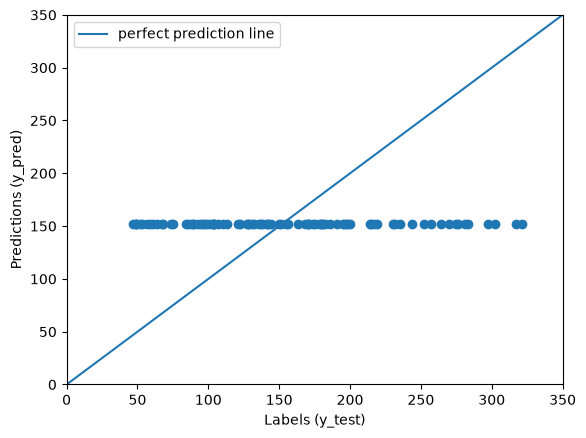
3. Exercise
YOUR TURN
Train and test a regression model based on the California Housing Dataset to predict the price of a house from its properties
from sklearn.datasets import fetch_california_housing
X, y = fetch_california_housing(as_frame=True, return_X_y=True)
# YOUR CODE HEREWhat is the MAE of your model in 💵? It should be roughly $30–40K. Always check the documentation to understand what the target variable (y) actually represents.